Qarett, by EMRALD
Qarett docs
Setup for each app, what the receipt asks, and exactly what Qarett can and cannot reach.
Before you start
Go to app.effortmastery.com and create a free account. Qarett saves your stints and receipts there, and you sign in with that account when you connect. Create your free account.
Hermes
- Run:
hermes mcp add qarett --url https://mcp.qarett.com/mcp --auth oauth - Wait for the command to return to the prompt.
- Run:
hermes mcp login qarett - A browser opens to the Qarett sign-in page. Sign in with your EMRALD email and password.
- Run:
hermes mcp test qarettto check the connection. Then say "list my Qarett projects".
Claude
On Free, Pro and Max plans:
- Open Customize, then Connectors.
- Choose Add custom connector.
- Enter the name Qarett and the server address https://mcp.qarett.com/mcp, then choose Continue.
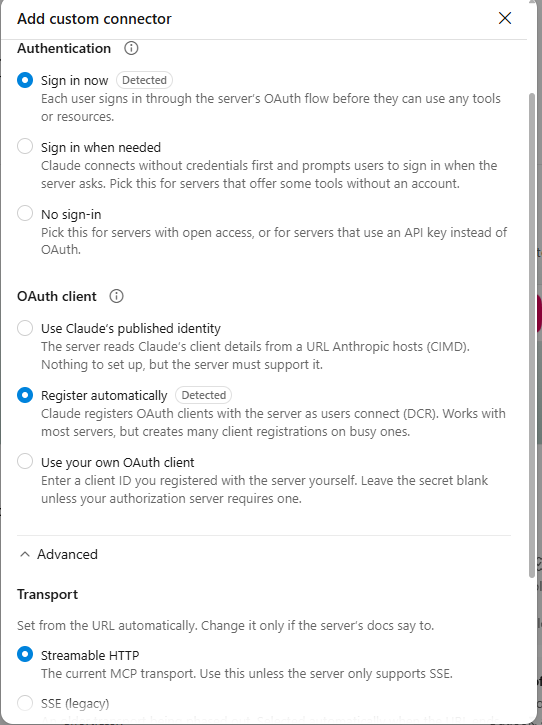
- Claude marks the right options as Detected on the next screen: Sign in now for authentication and Register automatically for the OAuth client. Leave those, and leave the transport on Streamable HTTP.
- Back in your Claude workspace, click the Connect button to finish connecting Qarett.
- The Qarett sign-in page opens. Sign in with your EMRALD email and password.
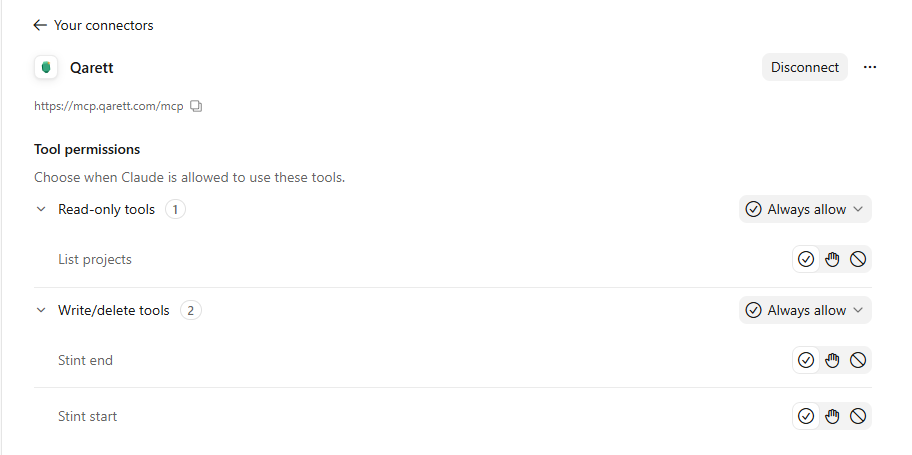
- Claude will now list Qarett's tools. Set your permissions as you like, then you're ready to track your work stints with Qarett.
On Team and Enterprise plans, an organization Owner adds Qarett first under Organization settings, then Connectors (choose Add, then Custom, and Web if asked). Members then connect it from Customize, then Connectors.
To use it in a conversation, open the + button, then Connectors, and turn Qarett on.
Other apps
Any app that supports remote MCP servers with sign-in can use the same address.
https://mcp.qarett.com/mcpThe address is for pasting into an app. It is not a web page, so opening it in a browser shows an error.
What happens the first time
You sign in on the Qarett sign-in page with your EMRALD email and password. Your AI app never holds your password. Then tell your AI you're starting work, or name a project: "Start a Qarett stint on my Henderson memo project."
Starting and ending a stint
- Your AI starts a stint when real work begins and ends it when the work is done. You can always say "starting on X" or "wrapping up" to set it yourself, or "not work" to discard a stint.
- A stint belongs to a project. A new project carries an effort level, E1 (light) to E4 (all-consuming), that you choose. It is your forecast of how demanding the work is.
- Qarett's server stamps the start and the end times.
The receipt
Three ratings are required, each 1 to 10. Everything else is optional.
Optional: how much of the stint went to verifying the AI's work instead of producing (1 almost none, 10 nearly all); whether you were in the zone (No, Somewhat, Yes); what made it effortful (complexity, emotional drain, high motivation cost, novelty or unfamiliarity, physical demand, uncertainty); on multi-day projects, any unexpected complications; and a note.
Your AI also offers a one-line summary of the kind of work, never the content. You see it first and can approve, edit or skip it before anything is saved.
The receipt card is built by the server. It shows Hard, Effort vs. task, Enjoyable, Verification time (your estimate, from your share and the server's duration), In the zone, Effort sources, and Forecasted effort beside Actual effort.
What Qarett can and cannot reach
Qarett holds a narrow key to your EMRALD account.
Can
- It can read your project list and whether a stint is open.
- It can create a new project with only a name and an effort level.
- It can start, stop and discard a stint, and file one receipt per stint.
- It can read how many receipts you have, as a count only.
Cannot
- It cannot pause, resume, rename, archive or edit a project.
- It cannot read your receipts, metrics, patterns or digest, and it cannot touch billing, your profile or other integrations.
What Qarett can see
- Qarett accepts only named fields. Every tool has a strict input, so it has no field for transcript text.
- The only free text that leaves your chat is the project name you chose, the optional note you typed, and the one-line kind-of-work summary you approved. The summary describes the kind of work, never the content, and carries no names, secrets, credentials, pasted code or quotes.
- Qarett reaches only what its narrow key allows: your project list, whether a stint is open, new projects, stints, one receipt per stint, and a count of your receipts. It cannot read your receipts, metrics, patterns or digest.
- Qarett stores the connection key encrypted. It records a few first-party events (connected, revoked, a refusal reason, receipt-style choice) with no content and no chat text. No third-party analytics SDK runs in the connector.
- Your AI app and its provider see your chat under their own terms. Qarett and EMRALD do not.
Turn it off any time
Open the Integrations page in your EMRALD account and choose Revoke. The connection also lapses after 90 days without use, and your AI will tell you to reconnect. You have one Qarett connection, shared across the AI apps you connect.
More answers
Does Qarett read my chats?
Qarett accepts only named fields, so it has no field for transcript text. The only free text it receives is your project name, your optional note, and the one-line kind-of-work summary you approved. Your AI app and its provider see your chat under their own terms.
Does Qarett see my EMRALD data?
Only what its narrow key allows (see What Qarett can and cannot reach). It cannot read your receipts, metrics, patterns or digest.